Meta Ads to Booked Jobs: How to Judge Your Ads by Jobs, Not Leads
Cheap Facebook leads feel great until none of them book. Here's how to track every Meta lead from form to signed job and pay for jobs, not names.
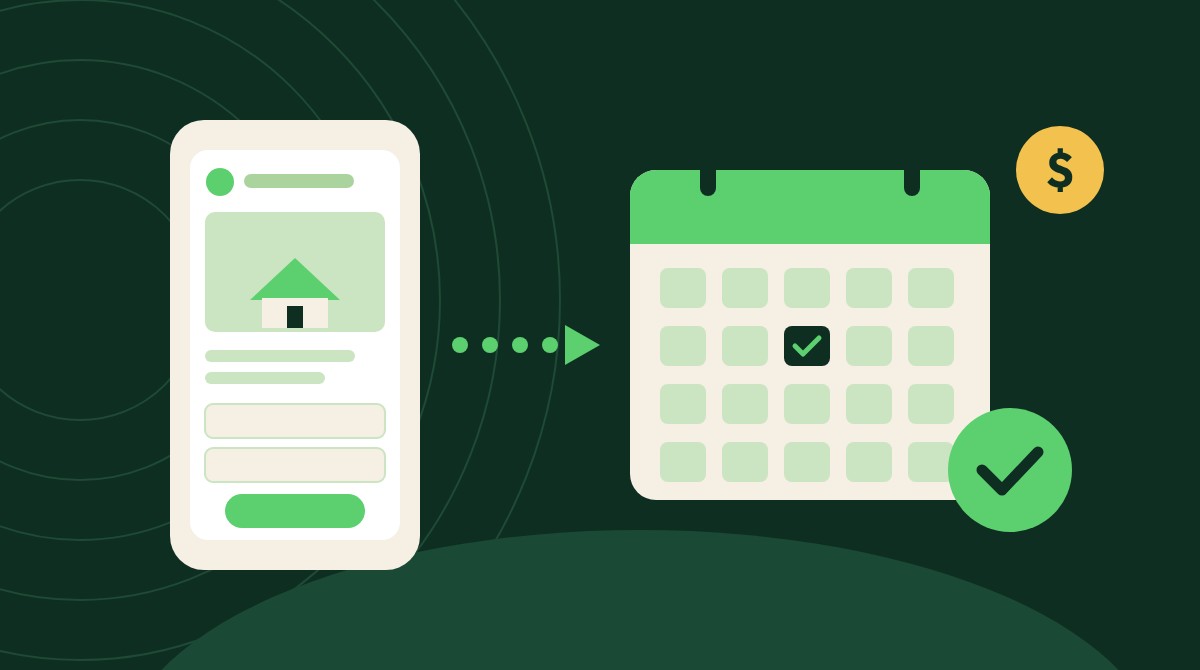
The short answer: Track five numbers for every Meta campaign: leads, qualified leads, scheduled appointments, appointments that ran, and revenue (ROAS). Qualify on the form, call within minutes, log every stage in your CRM, and send those stages back to Meta with the Conversions API. Then judge each ad by cost per booked job, not cost per lead.
Most contractors judge Meta ads by one number in Ads Manager: cost per lead. It's easy to see. It also says nothing about whether anyone got on your calendar or signed.
Why cheap Meta leads can cost you more
Meta reaches homeowners before they start shopping. The catch is intent. Someone scrolling Facebook wasn't looking for a roofer five seconds ago, so an easy form brings in plenty of half-interested people.
The leak gets worse at follow-up. A Harvard Business Review audit of 2,241 U.S. companies found 23% never responded to a web lead, and the ones that did reply within 30 days took 42 hours on average (Harvard Business Review). InsideSales' 2021 study of 5.7 million inbound leads found conversion rates were 8 times higher when the first attempt came within 5 minutes than when it came between 5 minutes and 24 hours (InsideSales).
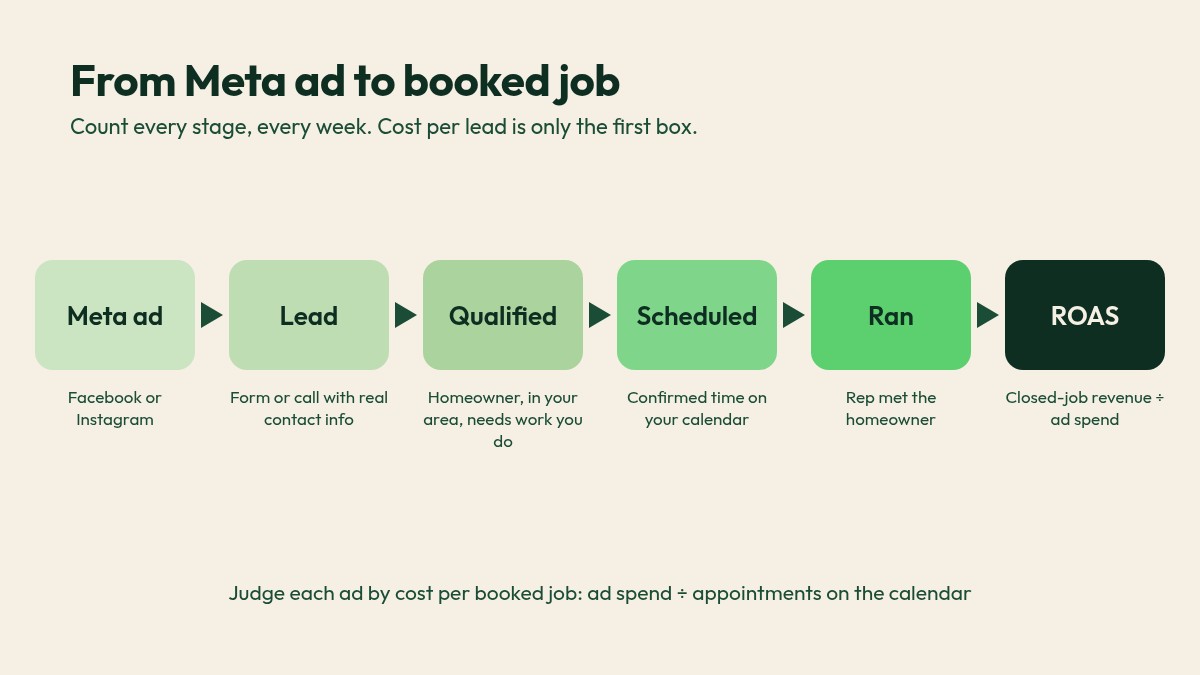
So a $20 lead nobody calls for a day isn't cheap. It's wasted. The fix is to measure the whole path, the way we run it as a fractional CMO: leads, qualified, scheduled, ran, then ROAS. Our contractor sales funnel guide covers the full funnel. This post applies it to Meta.
The Meta ads to booked jobs system, step by step
1. Write down what counts at each stage
Before you touch an ad, agree on definitions. A lead has real contact info. A qualified lead owns the home, is in your area, and needs work you do. A booked job is a confirmed time on your calendar. Ran means your rep actually met the homeowner. If your team counts differently, your numbers mean nothing.
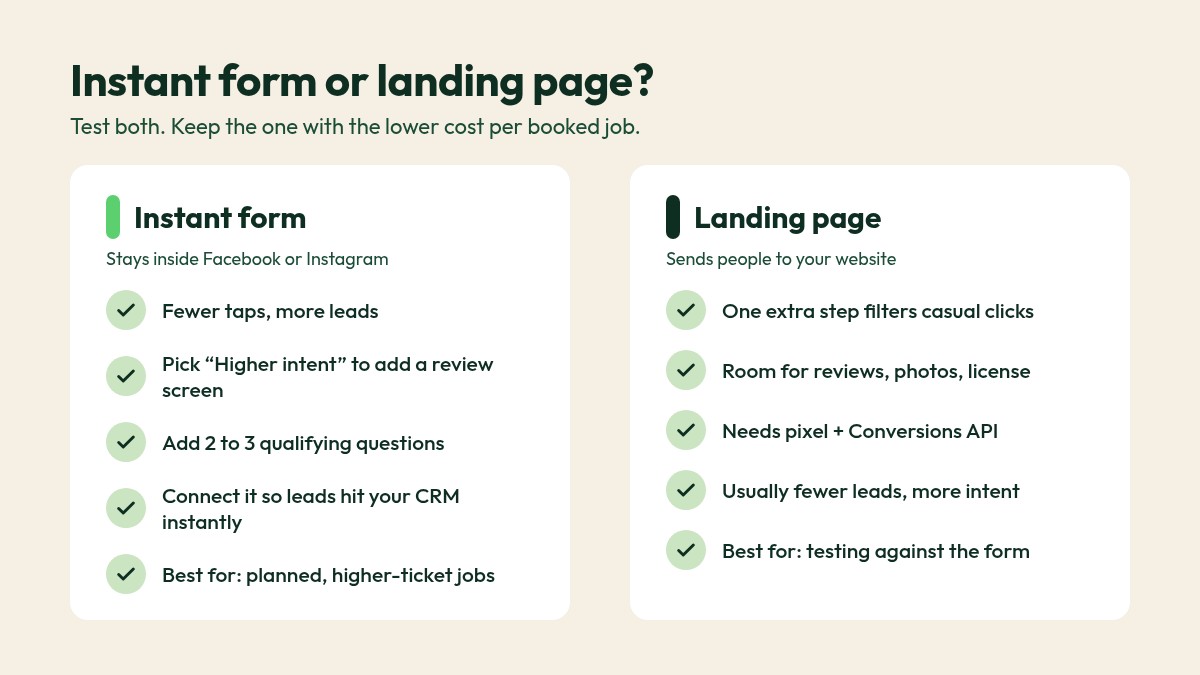
2. Choose lead forms or a landing page on purpose
Meta's instant forms keep people inside Facebook or Instagram. There are three types: "More volume" (the default), "Higher intent" and "Rich creative" (Meta Business Help Center). Higher intent adds a review screen so people confirm their details. Meta says it fits businesses that follow up with or qualify every lead. That's every contractor.
A landing page adds a step. That filters casual clicks and shows off reviews, job photos and your license. You'll get fewer leads, and you need the pixel and Conversions API on the site.
Our rule of thumb: start with a higher intent form for planned work like solar and roof replacement, test a landing page against it, and let cost per booked job pick the winner. More on lead forms vs your website.
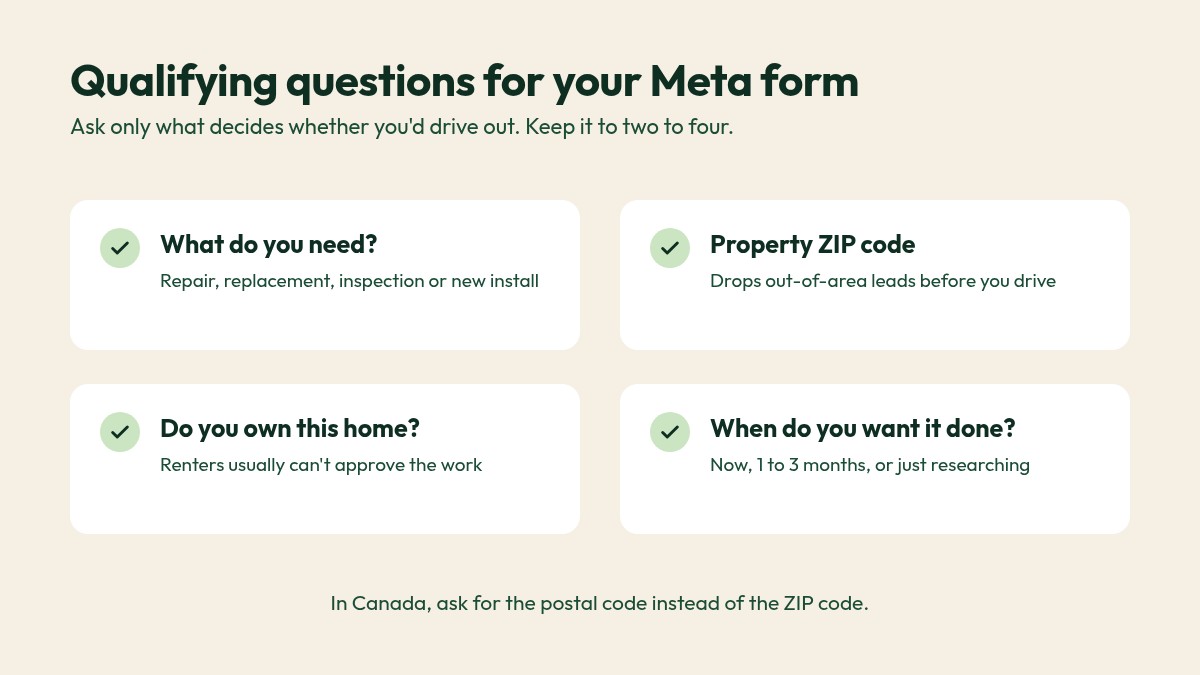
3. Ask two or three qualifying questions
Each question costs a little volume and buys a lot of quality. Ask what decides if you'd drive out:
- What do you need? (repair, replacement, inspection, new install)
- What's the ZIP code of the property?
- Do you own this home?
- When do you want this done? (now, 1 to 3 months, just researching)
4. Follow up in minutes, not hours
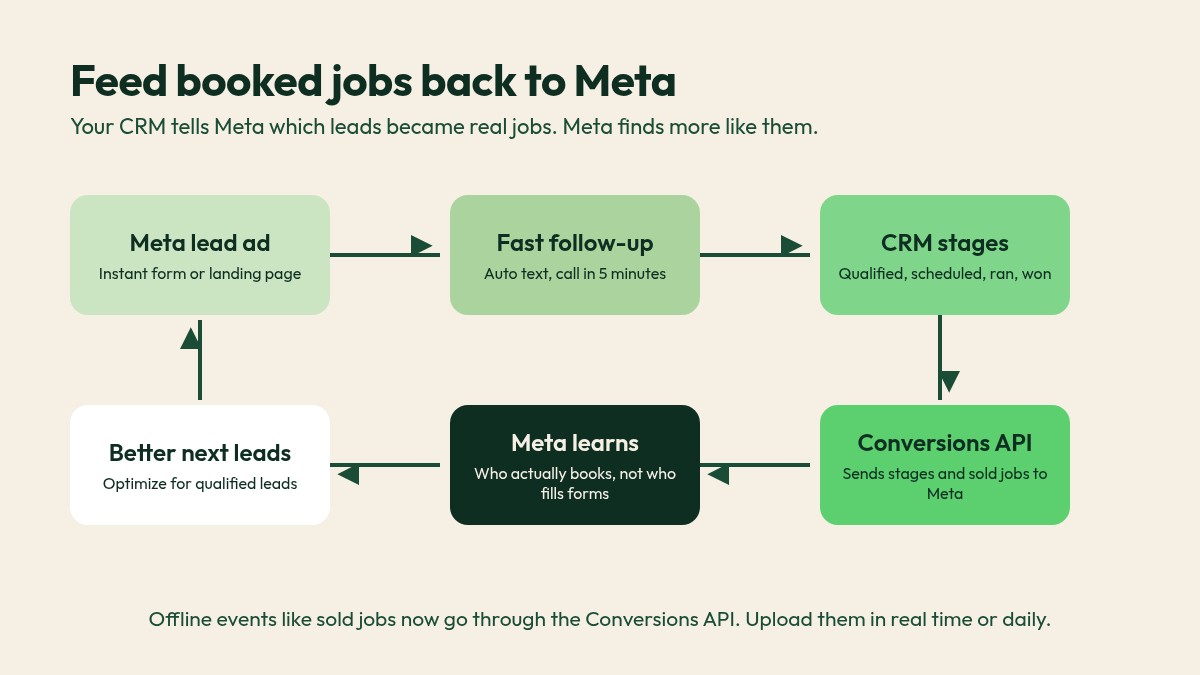
Text automatically the moment a form comes in, then call within 5 minutes. Route alerts to whoever books, with a backup. Our missed call text back scripts do the same for calls.
5. Track every lead by stage in your CRM
Every Meta lead should land in your CRM automatically, tagged with its ad, then move through stages: new, contacted, qualified, scheduled, ran, won or lost. If leads live in a rep's phone, you can't see which ad produced jobs. If Facebook shows more leads than your CRM, fix the connection first (why that happens).
6. Send booked jobs back to Meta with the Conversions API
This is the step most contractors skip. The Conversions API lets your CRM tell Meta which leads qualified, booked and sold. Meta then finds more people like the ones who booked, not people who just like forms.
Meta's own numbers make the case. Lead ads using Conversions API for CRM with the "Maximize number of qualified leads" goal on instant forms saw 21% lower cost per quality lead than ads optimized for volume (Meta Business Help Center). Advertisers with Conversions API for web events saw an average 17.8% lower cost per result than those without it (Meta for Business).
Two recent changes matter. Since April 2026, new campaigns can't use the qualified leads goal without a Conversions API integration (Meta Business Help Center). And the old Offline Conversions API was shut down in May 2025, so offline events like sold jobs now go through the Conversions API (Meta Business Help Center). Meta recommends uploading them in real time or daily (Meta for Developers).
You may not need a developer. Meta says many partner integrations are no-code, and it recommends 200+ leads a month for best results, with no minimum (Meta for Business). More on the pixel and Conversions API.
7. Judge every ad by cost per booked job
Cost per booked job is ad spend divided by appointments on your calendar. Read it next to ROAS (closed-job revenue divided by ad spend). Pause ads with cheap leads and expensive jobs. Scale the ones that fill the calendar.
Funnel math: cost per lead vs cost per booked job (example numbers only)
These are made-up numbers to show the math. They are not benchmarks and not client results.
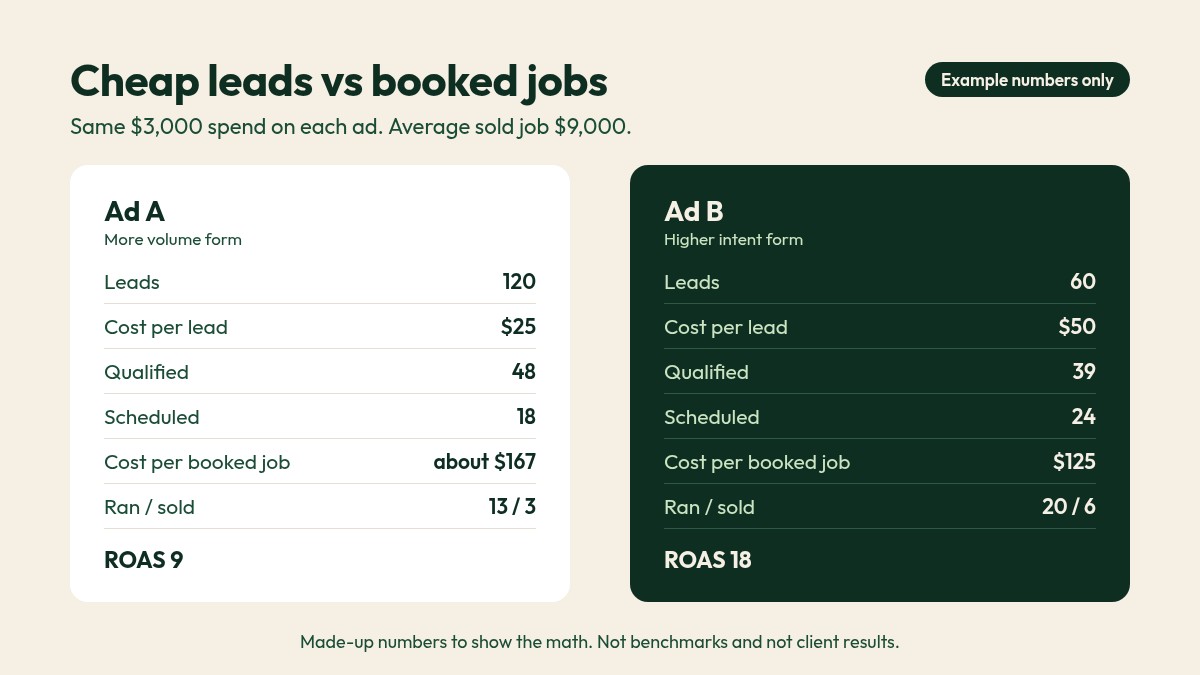
A roofer spends $3,000 on each of two Meta ads in a month. The average sold job is $9,000.
Ad A (more volume form):
- Leads: 120 (cost per lead = $3,000 ÷ 120 = $25)
- Qualified: 48 (40%)
- Scheduled: 18 (cost per booked job = $3,000 ÷ 18 = about $167)
- Ran: 13, sold: 3 (revenue $27,000, ROAS = 9)
Ad B (higher intent form):
- Leads: 60 (cost per lead = $3,000 ÷ 60 = $50)
- Qualified: 39 (65%)
- Scheduled: 24 (cost per booked job = $3,000 ÷ 24 = $125)
- Ran: 20, sold: 6 (revenue $54,000, ROAS = 18)
By cost per lead, Ad A looks twice as good. By revenue, Ad B is twice as good. Same spend. We never call an ad good until we see the calendar. To set targets, start with your break-even cost per lead.
A speed-to-lead follow-up script for Meta leads
Swap in your own names. One question per text.
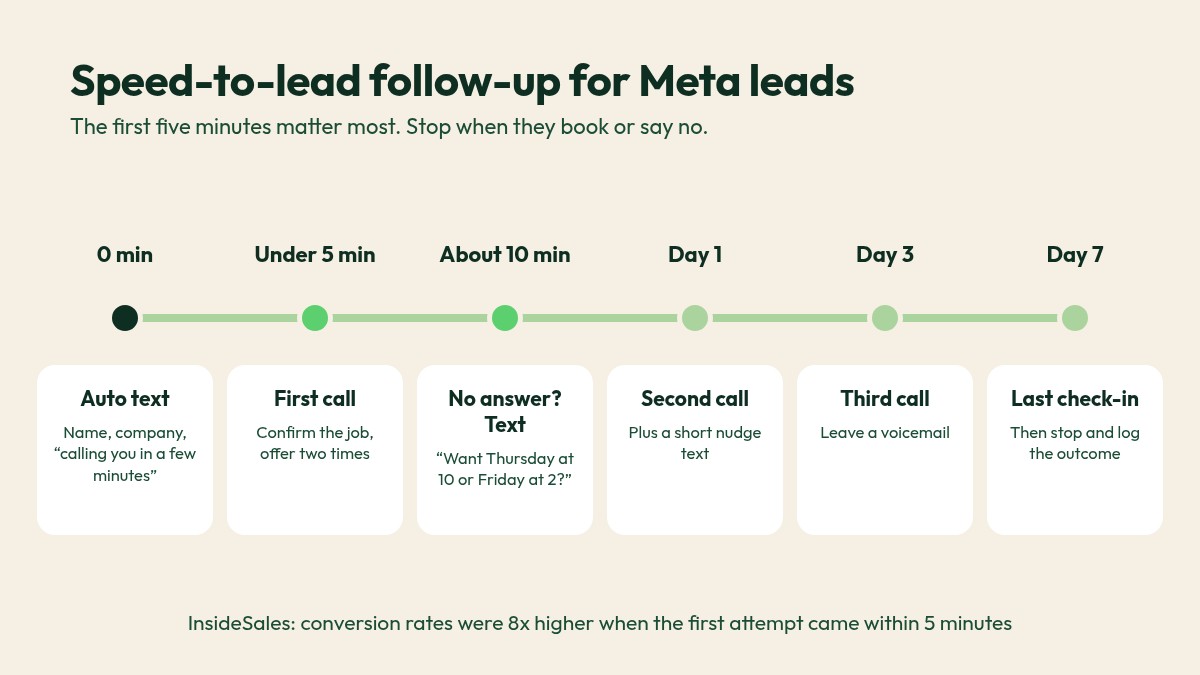
Instant text (sent automatically within a minute):
Hi Dana, this is Mike with Northline Roofing. Thanks for asking about your roof on Facebook. I'll call you from this number in a few minutes. Is now good?
First call (within 5 minutes):
Hi Dana, it's Mike from Northline Roofing. You asked about a roof replacement on Facebook a few minutes ago. I can have someone out Thursday at 10 or Friday at 2. Which works better?
No answer (text about 10 minutes later):
Sorry I missed you, Dana. Want me to hold Thursday at 10 or Friday at 2 for your inspection? Just reply with the one that works.
Then call on day 1 and day 3, and check in on day 7. Stop when they book or say no. Log every attempt.
Common mistakes
- Judging ads by cost per lead alone. Cheap leads that never book cost the most.
- Running the default form with no questions. You'll spend your week calling renters and people outside your area.
- No CRM stages. If you can't see scheduled and ran by ad, you can't tell what worked.
- Never sending results back to Meta. Without Conversions API data, Meta optimizes for form fills.
- Changing five things at once. Fix the biggest leak first.
Where this fits in your growth system
Meta ads sit in the Attract step of our growth system: Attract, Capture, Book, Improve. The money is made in the other three. The form or landing page Captures the lead. Fast follow-up Books the appointment. CRM stages and Conversions API data Improve the next campaign, because Meta learns from your real jobs.
That's why we set up Facebook and Meta ads for contractors and CRM follow-up together.
Meta ads to booked jobs FAQ
Do Facebook ads work for home-service contractors?
They can, especially for planned, higher-ticket work like solar, roof and HVAC replacement, and remodeling. For emergency work, Google usually comes first.
Are Facebook lead forms or landing pages better for contractors?
Forms usually bring more leads; landing pages often bring more intent. Test both and keep the one with the lower cost per booked job.
Why are my Facebook leads so low quality?
The form is too easy, the offer too broad or the follow-up too slow. Read the full answer.
How fast should I call a Facebook lead back?
Within 5 minutes if you can. Interest from a scroll fades fast. More on speed to lead.
What is a good cost per booked job for Meta ads?
It depends on trade, ticket size and close rate. Work it out from your own profit per job. Read the full answer.
Do I need the Conversions API for Facebook lead ads?
If you want Meta to optimize for qualified leads, yes. New campaigns need it for that goal.
Stop paying for leads that never book
Not sure which of your Meta ads actually put jobs on the calendar? Book a free growth call. We'll trace your Meta leads from form to booked job, find where they leak, and tell you what to fix first. No obligation, no generic pitch.
Sources
- Harvard Business Review, "The Short Life of Online Sales Leads": https://hbr.org/2011/03/the-short-life-of-online-sales-leads
- InsideSales, "Lead Response Study 2021 (Response Time Matters)": https://www.insidesales.com/response-time-matters/
- Meta Business Help Center, "About instant form types": https://www.facebook.com/business/help/252352181957512
- Meta Business Help Center, "About performance goals for lead ads": https://www.facebook.com/business/help/782657799338685
- Meta for Business, "Removing Technical Barriers to Help Businesses of All Sizes Get More From Their Ads": https://www.facebook.com/business/news/pixel-conversionsapi-updates
- Meta for Business, "Improve lead quality with the Conversions API for CRM": https://www.facebook.com/business/generate-leads/conversions-api-for-crm
- Meta Business Help Center, "Changes to the way you manage offline events in Meta Events Manager and Meta Business Suite": https://www.facebook.com/business/help/1835755323554976
- Meta for Developers, "Sending Offline Events Using the Conversions API": https://developers.facebook.com/docs/marketing-api/conversions-api/offline-events/
For roofing, solar, HVAC, plumbing & remodeling owners
Stop chasing leads. Start booking jobs.
One short email a week with a practical play to get more calls, more booked jobs, and less wasted ad spend. Built for contractors in the US and Canada.
We respect your inbox. No spam, ever.